WhatsApp-Widget
WhatsApp Widget
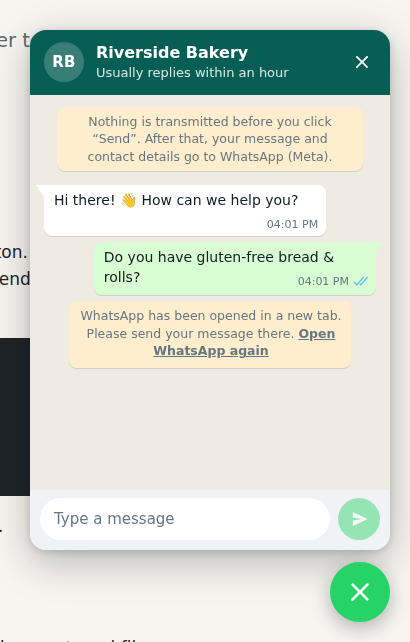
A privacy-friendly WhatsApp chat widget for any website. It looks like a live chat, but it only opens WhatsApp (app or WhatsApp Web) with the visitor’s message already filled in.
- One
<script>tag. No build step, no dependencies, no framework. - Privacy by design. No backend, no cookies, no tracking, no external requests. Nothing leaves the browser until the visitor presses “Send”.
- Open it your way. Floating button, auto-open after a few seconds, or your own buttons and links.
- Accessible. Keyboard support, screen reader labels, respects “reduced motion”.
- Themeable. Light, dark or automatic theme, your own colours, English and German texts.
- Optional e-mail notification. A small self-hosted PHP add-on sends you each message by e-mail, so no request gets lost.
Status: v2 is in development. The API may still change. See the examples.
Quick start
Add this before </body> and replace the phone number with yours:
<script src="https://whatsapp-widget.doebeling.dev/whatsapp-widget.js"
        data-phone="+49 911 1234567"
        data-name="Your Company"
        data-welcome="Hi there! 👋 How can we help you?"
        defer></script>
That’s it. Only data-phone is required. Use the international format with country code
(+49 911 1234567, not 0911 1234567).
For the strictest privacy setup, host the file yourself.
How the chat behaves
- After 6 seconds the first welcome message “arrives”: a red badge appears on the button and the button pulses once. If the visitor opens the chat earlier, the first message is being typed.
- When the chat opens, the next welcome messages are typed one after the other.
- After “Send”, WhatsApp opens with the message. The input field is locked and the send button becomes “Open WhatsApp”: the conversation continues in WhatsApp.
Examples
| Example | Shows |
|---|---|
| 1 · Minimal (source) | One script tag with a floating button |
| 2 · Own buttons (source) | No floating button, opened from links and buttons with prefilled messages |
| 3 · JavaScript API (source) | Configuration in JavaScript, German texts, 3 welcome messages, auto-open, events |
| 4 · PHP add-on (source) | Optional e-mail notification with the visitor’s phone number |
Configuration
Use data-* attributes on the script tag, or pass the same options (in camelCase) to
WhatsAppWidget.init().
| Attribute | JS option | Default | Description |
|---|---|---|---|
data-phone |
phone |
– | Required. Your WhatsApp number in international format. |
data-name |
name |
WhatsApp |
Name in the chat header. |
data-status |
status |
– | Text below the name, e.g. Usually replies within a day. |
data-avatar |
avatar |
initials | URL of a profile picture. Host it yourself. |
data-welcome |
welcome |
– | Up to 3 welcome messages. Separate them with \| in the attribute, or pass an array. |
data-placeholder |
placeholder |
localised | Placeholder text of the input field. |
data-lang |
lang |
<html lang> |
en or de. Falls back to the browser language, then English. |
data-position |
position |
right |
right or left. |
data-launcher |
launcher |
true |
false hides the floating button. Use your own buttons instead. |
data-badge |
badge |
true |
Shows a badge on the button and pulses once when the first welcome message arrives. false shows neither; the welcome messages are typed when the chat opens. |
data-badge-delay |
badgeDelay |
6 |
Seconds until the first welcome message arrives. |
data-auto-open |
autoOpen |
false |
Seconds until the chat opens by itself. Skipped on small screens. |
data-typing |
typing |
true |
Shows “typing…” before each welcome message. |
data-target |
target |
auto |
auto opens wa.me, web opens WhatsApp Web, app opens the installed app (whatsapp://). |
data-theme |
theme |
light |
light, dark or auto (follows the operating system). |
data-color |
color |
WhatsApp green | Colour of header, button and send button, e.g. #8a4b20. |
data-privacy-url |
privacyUrl |
– | Link to your privacy policy, shown in the privacy notice. |
data-privacy-notice |
privacyNotice |
localised | Your own privacy notice. An empty value hides it. |
data-notify-url |
notifyUrl |
– | URL of your PHP add-on. “Send” posts the message there first. |
data-ask-phone |
askPhone |
required with notify-url |
Asks for the visitor’s phone number: required, optional or false. Only works with notify-url. |
data-country-code |
countryCode |
+49 |
The phone field starts with this country code. The number must be international; 0176 … becomes +49 176 …. |
Example with JavaScript:
<script src="https://whatsapp-widget.doebeling.dev/whatsapp-widget.js"></script>
<script>
  WhatsAppWidget.init({
    phone: '+49 911 1234567',
    name: 'Max Mustermann',
    welcome: ['Hello! 👋', 'How can we help you?'],
    lang: 'de',
    autoOpen: 5,
  });
</script>
Open the chat with your own buttons
Add data-wa-open to any link or button. The value is optional and becomes the prefilled message.
<!-- Works without JavaScript, too: the link goes straight to WhatsApp -->
<a href="https://wa.me/499111234567" data-wa-open>Chat with us</a>

<button data-wa-open="Hi, is the olive tree in stock?">Ask about this product</button>
Use data-launcher="false" if you don’t want the floating button at all.
JavaScript API
WhatsAppWidget.init(options);                     // create the widget (replaces an existing one)
WhatsAppWidget.open();                            // open the chat
WhatsAppWidget.open({ message: 'Hello' });        // open with a prefilled message
WhatsAppWidget.close();
WhatsAppWidget.toggle();
WhatsAppWidget.destroy();                         // remove the widget
WhatsAppWidget.buildUrl('+49 911 1234567', 'Hi'); // "https://wa.me/499111234567?text=Hi"
Events
The widget does not track anything. If you want to count usage with your own (privacy-friendly)
analytics, listen to these events on document:
| Event | event.detail |
Notes |
|---|---|---|
whatsapp-widget:open |
{ auto } |
auto is true if the chat opened by itself. |
whatsapp-widget:close |
{} |
|
whatsapp-widget:send |
{ message, url, phone } |
Call event.preventDefault() to stop WhatsApp from opening. |
whatsapp-widget:notify |
{ ok, status } |
Only with notifyUrl: result of the request to your server. |
Optional: e-mail notification (PHP add-on)
Some visitors write a message but never press “Send” in WhatsApp, for example because WhatsApp Web
is not set up on their computer. If you don’t want to lose these requests, use the add-on
addons/php/whatsapp-notify.php. It runs on your own web server,
not on GitHub Pages.
- Download the file, set your e-mail address at the top and upload it to your web server (PHP 8.1+).
-
Point the widget to it:
<script src="/js/whatsapp-widget.js"
        data-phone="+49 911 1234567"
        data-notify-url="/whatsapp-notify.php"
        data-privacy-url="/privacy"
        defer></script>
The chat now asks for the visitor’s phone or WhatsApp number (required). So you can call back even if the visitor never sends the message in WhatsApp. The field starts with
+49; usedata-country-codefor another country. Usedata-ask-phone="optional"or"false"to change this, and setphone_requiredin the PHP file to match. - Update your privacy policy: with the add-on, the message (and phone number) goes to your server and mailbox before WhatsApp opens.
When the visitor presses “Send”, the widget posts the message to the add-on and opens WhatsApp at the same time. If the request fails, the chat asks the visitor to send the message in WhatsApp. You get an e-mail like this:
New message via the WhatsApp widget

Hello, we need a new logo for our bakery.

---
Phone: +49 176 123 456 78
Reply on WhatsApp: https://wa.me/4917612345678
Page: https://www.example.com/services
Time: 2026-09-25 17:52:20 CEST
What the add-on does for security and privacy:
- Accepts only
POSTrequests from your own website (checks theOriginheader). - Puts visitor input only into the mail body, never into mail headers.
- Limits the message length and the number of mails per hour.
- Stores nothing and writes no logs. Does not send or read cookies.
The privacy notice in the chat changes automatically when notifyUrl is set (see below).
Styling
The widget uses Shadow DOM, so your page styles don’t break it and its styles don’t leak into your page.
To change colours, set CSS custom properties on the whatsapp-widget element:
whatsapp-widget {
  --waw-color: #8a4b20;          /* header, button, send button */
  --waw-launcher-color: #25d366; /* floating button and send button only */
  --waw-font: "Inter", sans-serif;
  --waw-offset: 24px;            /* distance from the screen edge */
  --waw-z-index: 1000;
}
More properties: --waw-header-text, --waw-chat-bg, --waw-panel-bg, --waw-input-bg, --waw-bubble-in,
--waw-bubble-out, --waw-notice-bg, --waw-text, --waw-muted.
Privacy and GDPR
The widget is built for data minimisation. The notice at the top of the chat says what happens:
| Setup | Notice (English / German) |
|---|---|
| Widget only | Nothing is transmitted before you click “Send”. After that, your message and contact details go to WhatsApp (Meta). Vor dem Klick auf „Senden“ wird nichts übertragen. Danach gehen Nachricht und Kontaktdaten an WhatsApp (Meta). |
| With PHP add-on | Nothing is transmitted before you click “Send”. After that, your message and phone number go to us by e-mail, and your message and contact details go to WhatsApp (Meta). Vor dem Klick auf „Senden“ wird nichts übertragen. Danach gehen Nachricht und Telefonnummer per E-Mail an uns sowie Nachricht und Kontaktdaten an WhatsApp (Meta). |
The German texts avoid “du” and “Sie”, so they fit any website. Use privacyNotice for your own text.
In detail:
- Before “Send”: The widget runs only in the browser. It sends no requests, sets no cookies and uses no local storage. Icons are inline SVG, fonts are system fonts.
- After “Send”: The browser opens
wa.me, WhatsApp Web or the WhatsApp app. From this moment on, WhatsApp (Meta) processes the data under its own privacy policy. The widget shows a notice about this. - Only with the PHP add-on: “Send” also transmits the message (and phone number, if asked) to your own server, which e-mails it to you. The notice in the chat says so.
Hosting. whatsapp-widget.doebeling.dev runs on a server in Germany. GitHub Pages is only a
mirror. If you load whatsapp-widget.js from one of them, the visitor’s browser connects to a
third-party server and transmits the IP address, like with any externally hosted script or font. For the strictest
setup, download whatsapp-widget.js, upload it to your own server and change
the src. Host the avatar image yourself, too.
Mention WhatsApp as a contact channel in your privacy policy. This is not legal advice.
Browser support
All current versions of Chrome, Edge, Firefox and Safari (desktop and mobile). The widget uses modern JavaScript (ES2018) and does not support Internet Explorer.
Contributing
Issues and pull requests are welcome. The widget is a single file without build step:
whatsapp-widget.js. To try your changes, serve the repository with any static
web server (for example python3 -m http.server) and open the examples.
License
GPL-3.0 © DÖBELING Projektbüro
WhatsApp is a trademark of WhatsApp LLC. This project is not affiliated with or endorsed by WhatsApp or Meta. The WhatsApp icon is from Font Awesome Free (CC BY 4.0).